Last week we conducted our twice a year training for the Youth ChalleNGe teachers. They got an extra treat this time.
Rafal Pruszynski, the Sales Manager for Super 3D Plus Inc of Calgary, Canada was in our area visiting several prospective buyers and stopped by to show us some sample parts created on the ComeTrue T10 and M10 powder/binder printers.
We have been using full-color powder/binder printing for some time using our ZCorp Z450 and ah\\have been experimenting with ceramics for a while using a ZCorp 310. So, it was interesting to compare what we have been able to produce on our older printers with the output of the new ComeTrue printers. It was also interesting to compare cost of operation between the old and new systems.
COMETRUE SAMPLE PARTS
So, let's take a look at some of the images we captured and discuss what they mean for us.
ComeTrue 3D Prints Gypsum and Ceramic Prints
The ComeTrue T10 can print in full-color, which does not need to be fired, or ceramic materials that need to be fired in a kiln. The above collection contains samples of each. The statue in the middle, was not fired. It's simply a gypsum print. However, it looked carved due to the detail of the print.
The Sponge Bob like house was ceramic and colored during the firing phase. The Owl, tiles and vase in the top left were also ceramic. OUR COMPARISON GROUP
In this next group, we will add some of OUR prints for making the comparison.
Powder/Binder Prints including Z450
The first thing to notice is that the Z450's colors are faded and, because it relies on a older HP cartridges to supply the color there is visible banding. The bust with the plaid shirt and the buildings were printed on our Z450. The other thing that stands out in the caparison is that our old printer is just CMY. There is no true black because the black cartridge is emptied to permit it to dispense the binder. So, we can never achieve true black.
COMPARING COMETRUE PARTS WITH Z450 PARTS
This next two images demonstrate the differences in stark contrast.
ComeTrue Print (Left) vs. Z450 Print (Right)
Z450 Print(Left) vs. ComeTrue Print (Right)
While it has been great to have the Z450 to print in color, it is also clear that the ComeTrue T10 is infinitely better in terms of color, contrast and resolution. The ComeTrue 3D printer output is amazing!
COMETRUE PRINTS OF FULL BODY SCANS
But, I have one more sample to show you. I wish I had copies of these next images in full resolution so the detail could be examined at full size. But, the copies of the images I have appear to have been reduced to ease sending via email. Even so, I think you will be VERY impressed. No, that is NOT an image of a man. It is an image of a full-color print of a SCAN of a man! It's AMAZING!!!
Full color print of a scan printed on the ComeTrue T10
Needless to say, the teachers and our team a YouthQuest Foundation were very happy that Rafal was able to make it east and include us in his itinerary. The sample prints speak for themselves. I am including Rafal's contact information just in case you are interested in powder/binder printing. It is my favorite 3D printing technology and I have a new favorite powder/binder printer.
Rafal PruszynskiSales Manager Super 3D Plus Inc / 4G Vision Tech Ltd 1-(403) 452 2200 (office) 1-(403) 880 4 sales@super3dplus.com #140 3553 31 ST NW Calgary AB Canada T2L 2K7
Lastly, something most people may not think about.... open source materials and reliability. While we can use use 3rd party powders and binders in our ZCorp 310, that is not so with the Z450 or, as far as I know, of any of the present offerings from 3D Systems. Moreover, we could not keep our Z450 printer running very long without paying $6,000+ for an annual maintenance contract.
But, I am told most of the parts of the ComeTrue T10 are user serviceable and readily available. That is a HUGE consideration. And, I do mean HUGE!
I was going to move on to powder handling for my second "Due Diligence"; but, I got waylaid by my growing appreciation for the documentation available to us that provides a wealth of information as we do our research into the T10 and/or M10.
A good place to start is with a document I was late to find. And, that is a PDF that compares the T10 and M10 side-by-side.
Yes, you will find some spelling errors and typos in ComeTrue3D's English language documentation and web pages. But, don't let that fool you. There is a wealth of information that transcends ANY such minor flaws. Here are some things I learned from this one document.
Lines 1 through 4
Let's begin with the first four lines of the comparison table:
Model
T10
T10
M10
Application
Full-Color
Ceramic
Ceramic
Build Size
200x160x150(mm)
200x160x150(mm)
200x160x150(mm)
Max part size
190x150x140(mm)
100x100x60(mm)
100x100x60(mm)
We glean three interesting facts from these first four lines...
1. The T10 CAN Print in both Gypsum and Ceramic
The M10 is a less expensive version of the ComeTrue3D powder/binder printer that eliminates the full color capabilities to save money. But, it is not the only version that can handle ceramic powder. This is clear from the very first lines of the comparison sheet.
2. Color is Not Available with Ceramic Powder
Notice that the application doesn't split the two capabilities between Gypsum and Ceramic. It differentiates between Full-Color and Ceramic. I am trying to find out why. The aborted 3D Systems CeraJet ceramic printer could print in color using ceramic powder. So, I'm wondering if this might have something to do with 3D Systems patents, which would be aggressively defended.
Or, it could be an ink formulation issue where the current inks simply can't stand up to the heat. While it's an interesting question it is not a huge deal to us since NONE of the new ceramic printers can print in full color.
3. Build Size the Same but Part Size Differs by Application
Interestingly, when printing in ceramic powder, the allowable part size is reduced considerably. Nothing in the documents I've reviewed so far indicate the reason for this. It's certainly a factor in making a decision. True, it is very easy to use glaze to bond multiple parts during firing. But, even so it's hard to give the ComeTrue3D printers a 10 out of 10 when it comes to allowable part size when printing with ceramic powder.
Lines 5 through 10
In lines 5 through 10 of the comparison sheet we learn the following:
1. Type is "Desktop"
All of the models are classed as "Desktop" and are the same physical size.
2. Print Speed is 20mm per Hour
The great thing about powder/binder printers is that height is time. Unlike FDM printers, the difference in time between printing one item or 15 items is negligible. With a print speed of 20mm per hour, if the maximum Z-Axis is 60mm, then the longest print job would be about 3 hours plus the time to initialize a print job.
3. Layer Thickness Defaults 0.08mm, but, is Variable
Z-Axis Layer thickness is as little as 0.08mm. However, the listing for the M10 includes special modes specifically designed for developers wishing to use experimental powders. However, based on my earlier conversation with actual users, I'm thinking that this capability extends to the T10 as well. This would be a good question to ask your sales rep if you plan to use either of these printers in an experimental lab.
Lines 11 through 14
1. The M10 Permits "Print Time" and "Nozzle Slot" Selection for Developers.
Actually, this is talking about the number of times the printer applies binder for each layer. This is specifically provided to address the fact that "green" ceramic prints are more delicate than full color gypsum prints. ALL of the colors in the T10 are listed as "BINDERS". So, one can assume that full-color prints are sprayed with a bit more total binder in each pass than is a ceramic print. My understanding is that, being able to tell the printer to make multiple binder passes for each layer ensures that more binder is delivered and, theoretically, the 'green' part is a bit more robust.
The slot number selection may have to do with using experimental binders.
2. Horizontal Resolution is 1200 x 556 dpi
This is true of both the T10 and the M10 and is the same for both full color and ceramic. This is excellent resolution. But, remember, the true smoothness of a part surface is going to be determined by the powder used. Parts printed in fine powder will be able to benefit by this resolution better than those printed with a coarse powder.
3. The T10 uses TWO Print Heads and the M10 only uses ONE.
Both print heads on the T10 share the duties of dispensing color and binder. Since, the M10 is not a color printer, there is no need for a second head. Each head has 2400 nozzles for a total of 4800 nozzles on the T10. The print heads are MUCH larger than those on our ZCorp 450 or 310.
Lines 15 through 20
Most of the information in lines 15 through 20 demonstrate that the two different models are essentially the same in most categories of specifications. In summary both the T10 and M10:
Use the ComeTrue Print client software
Connect via USB 2.0
Are Certified for CE, FCC/IC
Operate in Windows 7 / Vista / 8 and 10
Operate at 100-210 or 200-240 volts
But, there is one significant difference in comparison line item 16.
The T10 Relies on .WRL Files for Printing Color
Both the T10 and the M10 can print from STL files. But, for color printing the only file type that it appears the comeTrue Print client can send to the T10 is the .WRL file type. Other common color file types like .OBJ, .PLY or .3DS must be converted to .WRL for printing.
This is not uncommon. The ZCorp Z450 requires "Vert color" .PLY or .WRL file types. But, it may be a new limitation to those not familiar with color printing. ComeTrue 3D has private labeled the "Pro" version of Netfabb as PixiRite Preparation Software. I understand that the cost is $1,500.
Since it is based on the NetFabb engine, it promises to be an excellent 3D file correction and converter software. While there is a "free" version of Netfabb available, it doesn't even come close to the power delivered by PixiRite.
Particularly if you are planning to capture 3D images for printing, I would urge you to seriously consider including PixiRite Preparation Software with your purchase.
We currently use Meshlab to make this type of file conversion. While free, it requires some complex workflow and we have not been entirely pleased with the conversions from .OBJ meshes to Vert color .WRL. Based on the little I've explore PixiRite, the whole conversion process looks cleaner and better. But, it is not something that I have been able to verify as yet.
Line 21
The final comparison in this document lists the consumables used by the T10 and the M10 in both full-color and ceramic print configurations.
Here is where it gets confusing...
Confusion #1 - Color Binders Under T10 Ceramic Column
I am not sure if this is simply an oversight or whether it's a hint that we can, in fact, use the color binders with ceramic. I have a call into the rep to clarify this.
Confusion #2 - Post Process Materials Included
In both the T10 and M10 ceramic columns, there are a number of materials that are NOT directly used with the printer itself. They are used only in the post-processing phase after printing is complete They are:
TP-81 (Ceramic Patch Powders) 200g)
TG-82N (Clear Glaze Powders) 500g
TG-82W (White Glaze Powders) 500g
All of these are powders that are mixed with water. TP-81 is used to fill cracks and holes that can happen when moving the part from the printer to the powder recovery booth. TG-82N and TG82W are powders meant to be mixed with water and applied as glazes in the final firing, if desired.
What is unclear at this point is the role of using a thin "slip" for the second firing cycle that permeates the part as is common with other ceramic powder workflows.
One thing is clear as I continue on my "Due Diligence" journey attempting to learn all I can about the ComeTrue3D series of powder/binder printers. Having had previous experience with ZCorp powder/binder printers helps me appreciate the thoughtfulness of MicroJet Technology's engineers as they designed these two printers. While there is still a lot to discover before choosing a printer for our future needs, it is clear that the quality of the candidate products is MUCH higher than I first suspected.
Anyone looking to buy one of the new breed of powder/binder printers is looking for a workhorse to support a serious business or educational function. These are NOT printers meant for hobbyists. And, that even includes the Kwambio Ceramo Zero Max having the lowest introductory price of about $5,000. All of the others are going to cost between $20,000 to $40,000. These include the Kwambio Ceramo Two, the xyzPrinting PartPro350 xBC, the ComeTrue3D T10 and the ComeTrue3D M10.
The enemy of that goal is downtime. So, part of the "Due diligence" responsibility is to try, as much as possible, to estimate what the vendor has done, both in terms of design and support to mitigate downtime. This is a bit tough when few machines are in the field and reliability history is in short supply. But, because it is essential to come up with the best evaluation as possible whatever the situation, we are forced to simply do our best by looking at what IS available. It would be wonderful to be able to wait until there are hundreds of users in the United States; but, we don't have that luxury.
I have to be honest, when I first began looking at the ComeTrue3D line of powder/binder printers all I saw were short slick sales videos with little real information. But, once I was able to talk with some users who had such great things to say about the A10 printer, MicroJet Technology and the Canadian distributor, it was clear that doing whatever it took to dig deeper was going to be well worth the effort.
The first goal was to find any and all documents and videos that would provide a more full understanding of the printer itself. So far this amounts to:
2 Overview videos
5 User documents
5 Intro - 1st Steps Videos
14 User Update & Repair Videos
4 Advanced Maintenance Videos
3 Cost Estimator Spreadsheets
2 PixiRite Software and Tutorials
I have taken the time to view each and every one of the videos and browse each of the documents.
This post will be limited to simply providing a summary of thoughts arising from reviewing the videos and documents surrounding the inking system. In subsequent posts I will delve more deeply into what I believe EACH of the materials reveal about the product and the philosophy of the company behind it.
First, MicroJet Technologies seems to understand the true situation of potential users in the United States. They are located in Korea. Their distributor is in Calgary Canada. And, we are thousands of miles away. The more we can help ourselves when issues arise, the shorter our downtime. The evidence that MicroJet Technologies understands our justified concerns begins with some fundamental design decisions as evidenced in the videos so far released.
It starts with, potentially, the most vulnerable parts, those of the INKING SYSTEM.
We have an old ZCorp Z450 color powder/binder. The designers decided to rely on then easily available HP B/W and Color print cartridges for the basis of their inking system. The same is true for the ZCorp Z310 Plus that was just donated to YouthQuest Foundation. While the HP cartridges used in the Z450 are still available, the HP10 used by the Z310 has not been manufactured since 2016! They can be found on eBay; but, they are extremely old and at some point will NOT be easily replaced. The most frequent errors thrown by the Z450 are printer cartridge "POGO" errors requiring replacement before proceeding.
Microjet Technologies uses their own cartridges. This makes sense because they are a huge manufacturer and innovator of inkjet print heads. What's more, the cartridges are continuously filled by large bottles of ink! You don't replace a cartridge when the ink runs out. You simply replace the bottle of ink... the least expensive part.
Not only is this strategy far less expensive than using a small conventional ink jet printer cartridge, with the T10, it means that materials other than colored ink can be fed through the cartridge. One of the existing users is doing just that. They are experimenting with using multiple binder types at the same time. They can even color the secondary binder if they want. this kind of versatility is not only useful in research, it tells us the value of the design. It may seem like an oxymoron; but, it's a closed system (proprietary cartridges) that is also OPEN (user supplied inks & binders).
So, lets start with the ComeTrue T10 3D Printer Installation Video that illustrates our point.
There are a number of things to point out in this video that tell us a lot about the philosophy behind the design of the T10 and that carry over to the M10.
Loading Ink and Binder is Software Assisted
The client software that comes with the T10 or M10 has a Maintenance Tool Tab that positions the printer carriage to the correct place for both loading materials or cleaning the print heads.
Easily Accessible Liquid Consumables
All of the liquid consumables are located outside of the printer. And, the status of all of the liquid consumables can be ascertained well in advance of running out of one of them. While we would take the precaution of having at least one of each replacement on hand, it's still a good feeling that we would know well enough in advance we were getting low on something in time to order a replacement.
The liquids include inks (Cyan, Magenta, Yellow and Black), binder and cleaner.
It's also nice to know they are LOCKED into place!
The Liquid Feed System is Ingenious and Simple
The ink flows through tubes, having insertion pins, to the print heads . The clips that permit locking a tube are color coded and the print heads themselves are very easily inserted. The video cautions the user to make sure that both print heads are completely in place. That's easy enough.
Cleaner Dispenser is Built In to the System
We
appreciate the fact that the cleaning system is an integral part of the
design of this printer. While other videos show that we still have
some manual cleaning to do, it's nice to know thatat least the major cleaning functions can be handled from the client software itself.
The video demonstrates that the cleaning process is done when the cartridges are initially loaded and can be repeated later as needed.
Also, it should be noticed that the level of cleaning is user selectable.
Summary for Due diligence #1
The inking system of the ComeTrue T10 (and consequently the M10) is a HUGE improvement over the inking systems used in the ZCorp powder/binder printers we now own.
While the savings won't cover the costs of buying a ComeTrue, they should be significant. But, the real benefits should come from less down time from "POGO" errors involving the older HP print heads. And, ultimately, having the same manufacturer responsible for both the printer and the print heads should ensure that the situation where the print heads are discontinued for otherwise viable printers should never happen with the ComeTrue 3D printers.
The simplicity and versatility of the inking system is also a positive factor. The fact that one user is replacing a color for an extra binder tells me that the system is not preventing users from finding alternative materials. In fact, I am told this openness extends to the powder as well.
This not only is a big positive about the printer; but, says a lot about MicroJet's customer centered design philosophy.
Finally, our current color powder/binder printer is CMY, with the black cartridge being emptied and used for dispensing binder. Obviously, black features are rarely black. But, it also affects ALL the color tones. The CMYK system of the T10 promises to be a hugely significant improvement.
I give the inking system a 10 on a scale of 1 to 10.
UPDATE: After fighting to find good HP10 cartridges for 7 plus hours for the ZCorp 310, I am more convinced than ever that the newer printers, like the ComeTrue T10 and M10 HAVE to be a vast improvement. Finally got thr 310 to print; but, it was touch and go for a while.
This post is NOT going to be a review because I do NOT have a ComeTrue 3D Ceramic printer with which to conduct a review. It is simply a public disclosure of my private investigation into a possible candidate for us to purchase in our quest to print in ceramics.
Nothing should be read into this report because it is the first printer I am relaying any results of my research. It's simply the only new ceramics capable powder/binder printer under $50,000 with which I am aware that is actually in the hands of users.
So, far I have been able to talk with two persons having experience with the ComeTrue T10 full-color powder/binder printer and the North American distributer. While this is not a wide swath of people, we have to rely on where we are now and that is a small user base so far. Neither had the M10 version; but, if anything, one might expect the A10 version would be more complex and prone to failure. At least that is my assumption. Again, we're going with what we have.
Both contacts were in university settings. One was in Texas and the other in Wisconsin. Here are my summary reports 1. Manufacturer's Background (MicroJet Technology)
The ComeTrue line of powder/binder printers is manufactured by MicroJet Technology located in Taiwan. They were established in 1996. While they produce a range of products, it appears that they are best known for their thermal bubble inkjet printheads, inkjet cartridges and "CurieJet" liquid micro pumps. With this in mind, it makes sense that they decided to tackle powder/binder printing since all of these elements are at the core of powder/binder print engines. That being said, one would be hard pressed to be able to intelligently evaluate the ComeTrue printer based on any information found in the MicroJet Technology web site. Their dedicated site for the ComeTrue line of 3D printers, found at https://www.cometrue3d.com/en/ is a bit more helpful, it is still left up to the visitor to find out truly helpful information.
In short, in my mind, now that I know more, their web site does not truly reflect the value of their product and their commitment to a buyer. That simply means one has to dig a bit deeper to find the gems and I was motivated enough to do so.
2. North American Distributor (Super 3D Plus Inc)
The North American distributor is listed as "Super 3D Plus, Inc" in Calgary, Canada. But, when you click on the link, it takes you to http://www.calgary3dprinting.ca/. Confused? So was I. And, what was particularly confusing is that there wasn't a single reference to the ComeTrue 3D printer on the home page. It's only after you click on the "3D Printers and Scanners" link, that takes you to a page for a company called 4G Vision Tech, that you find the ComeTrue 3D printer among a host of other consumer printers and scanners.
I don't blame you if you think things are getting a wee bit sketchy here. And, if I told you that I called four times without actually reaching a person, I wouldn't blame you for thinking me very foolish to proceed.
The good news is that when a real person called me back, they sounded like they actually knew what they were doing and had some very good responses to my naturally leery questions. But, the best response was that not only have some ComeTrue 3D printers been delivered to customers in the United States; but, they would help put me in touch with them so that I could found out a real user's experience directly from the user. 3. Current Users are Serious Academic Research Facilities
I hope I can be forgiven for expecting the user referrals would take me to somebody working alone in a basement that nobody could validate. But, I was certainly wrong. I was given 3 names from two prominent technical universities using the printers for serious research. As I noted earlier, one was in Texas and the other in Wisconsin. I looked up all the referrals to confirm their credentials before contacting them. Very, very pleasantly surprised.
4. ALL Users Reported EXCELLENT Support
My first question, of course, was "Is it real?" Given that was answered in the affirmative, I then went on to ask about reliability and support issues. Every single user had nothing but great things about Rafal and Gary, their distributor contacts. Moreover, they were effusive about the support they got from the engineering team in Taiwan! This support even rose to the level of adding custom features into the client software to support the specialized materials with which they were experimenting.
5. THE perfect Research Platform
These users were going well outside the normal range of uses because they were using the ComeTrue to experiment not only with custom powders; but, unique binder combinations. If anything was going to stress the ComeTrue A10 it is the work these users are doing. In fact, one called the ComeTrue THE perfect experimental platform for high peformance ceramic research. That was because they could so easily swap out powder materials and use a mix of custom binders.
By the way, one is operating with powder MUCH finer than the stock material, which sounded very interesting.
6. Parts are Reasonable.
Because the supplier is in Taiwan and my own experience with powder/binder printing says things WILL eventually break it was important for me to find out the costs of expendables and replacement parts, like boards, that might bring our operation down. The printer was described as relatively uncomplicated with affordable parts that could be kept on hand in case of emergencies. Printheads, for instance, have a mean-time failure rate that is fairly constant. So, having a spare around is a good idea. Since the user relating this information also had ZCorp printers, they pointed out that the life xpectancy of the ComeTrue parts was better than the HP printheads used in the Zcorp printers. 7. Tentative Evaluation
Since none of the users actually owned an M10, it's impossible to reach a firm conclusion from a couple of phone calls and emails. But, I've not heard a single bad thing about the ComeTrue platform. In fact, they only thing remotely negative was simply to point out that the print area is more limited that the old ZCorp 3D printers. And, I already knew that. While a factor in making a final decision, it's just one of many considerations.
Quite frankly, I am VERY impressed by what actual academic researchers had to say and I not only have a very positive outlook about the team at the distributor; but, the commitment of the team in Taiwan to deliver a positive user experience to owners.
If you are in North American you can reach the distribution team through this contact page:
I have had the privilege of being able to experience many forms of 3D printing, from very low cost consumer FDM 3D printers to professional Multi-Jet 3D printers costing nearly a hundred thousand dollars. But, my favorite 3D printer type has always been powder/binder printing.
Perhaps first and foremost, you don't have to deal with vexing supports marring complex and beautiful finished parts. The powder is, itself, the support system and it is easily blown off the part at the end of the print. But, another reason is that it is a surprisingly clean and safe method of printing. In my mind it is MUCH safer and, ultimately, cleaner than liquid resin SLA.
Ceramic 3D printing, could be within reach of designers and artists, has been around for a while in the form of extrusion printers using a form of semi-liquefied clay. May clay artists have found this method of printing to work well for them. Extrusion clay printing has definitely been of value to others; But, it's never had an attraction for me. Maybe I know that I'm just too lazy to clean up the mess after the print is done.
Earlier posts have talked about my experience with ceramic resin using a Formlabs Form2. While we seem to be making progress with reliability, and it definitely has a place for small, intricate items like making ceramic jewelry. It still is NOT a method I would want to count on to build a 3D ceramic printing business due to the print times. It is not particularly well-suited for scalability.
I'm just going to say it. My bias is toward powder/binder, which is remarkable since I personally have not printed a single ceramic item on a powder/binder 3D printer. The problem up to this point is that unless one was willing to spend several hundred dollars there were no powder/binder printers dedicated specifically for ceramic powders. One had to modify a gypsum powder/binder printer and find a 3rd party to supply an appropriate ceramic powder and accompanying binder.
Ceramic Powder/Binder Printing to this Point in Time
Tethon (Tethon3D.com) is one such company. They provide several clay based powders to those who wanted to convert older ZCorp 310 printers to create ceramic 3D objects. At YouthQuest Foundation, we were just given a surplussed ZCorp Z310 Plus by the Fairfax County School System.
ZCorp Z310 Plus Powder/Binder Printer
Like our ZCorp Z450 printer, the 310 is designed to use a gypsum powder. But, unlike the Z450, it is monochrome. And, more importantly it does not rely on a cartridge binder supply system. Binder is poured into a container on the right side of the machine, allowing for the use of 3rd party binders. And, because the 310 is no longer supported by any manufacturer there is no risk of voiding a warranty because this is none. When we obtained it, there was no print cartridge installed. So, we have no idea if or when we might be able to get it up and running. But, if and when we do, we will test one or more of the ceramic powders available from Tethon3D.
The down side, even if it does work well, is that it uses an HP 10 printer cartridge and, while they are still available on eBay, they have not been manufactured since 2016! So, it is NOT a printer upon which we can rely too far into future. Sooner or later even if one could find an HP 10 cartridge, the chances of it working would be slim to none. But, for now, it is our best hope to begin our journey into printing in ceramics at the lowest possible cost and risk.
New Options: Kwambio & ComeTrue
A week or go, I would have written that there were only two new options for printing ceramics in 3D that was anything close to being a reality. And, those options came from the same company, Kwambio. The Ceramo Zero Max, at around $5,000, is the low-cost option and the Ceramo Two, at around $40,000, is the professional option. (Prices might vary when actually released) But, now I know that there are two viable companies making viable ceramic powder/binder printers. Let's first examine Kwambio.
Kwambio - Ceramo Zero Max, Ceramo Two
The primary printer I've been following for the past few months is by Kwambio.
We also have a sample part printed on a Kwambio ceramic printer.
It has a wonderful feel and finish. So, we know that it can produce beautiful ceramic prints. I wish I could tell you more; but, as far as I know, there is not a single Kwambio printer in the field as it has yet to ship. Do I believe it's real? Yes. But, until I visit the Kwambio offices in Hartford, CN, I am completely relying on the part I have in hand and the great communications I've had with Kwambio's sales and marketing teams.
Microjet- ComeTrue
For over a year, I have been following reports that two new powder/binder printers were reportedly being readied for market by Asian companies. One was by SkyTech and was called the 3DPandoras. So, far the 3DPandoras is what we used to call in the video game field, "Smoke & Mirrors". From what I can tell, so far, all they have managed to achieve is to make their kickstarter customers demand their money back. While that could change in the future, I'm not counting on the 3DPandoras any time soon.
Until a week or so ago, I would have told you that the ComeTrue ceramic printer was ALSO most likely smoke & mirrors. But, while reading about Tethon3D powders, I stumbled upon a reference that their powders also work in the ComeTrue M10 3D printer. Hmmm... how could they know unless there was an actual ComeTrue printer with which to test it. So, I made a concerted effort to see if, in fact, the ComeTrue printers had started shipping into the USA.
It took some effort; but, that effort paid off when I was actually able to talk with the North American distributer and quickly got some references for actual users.
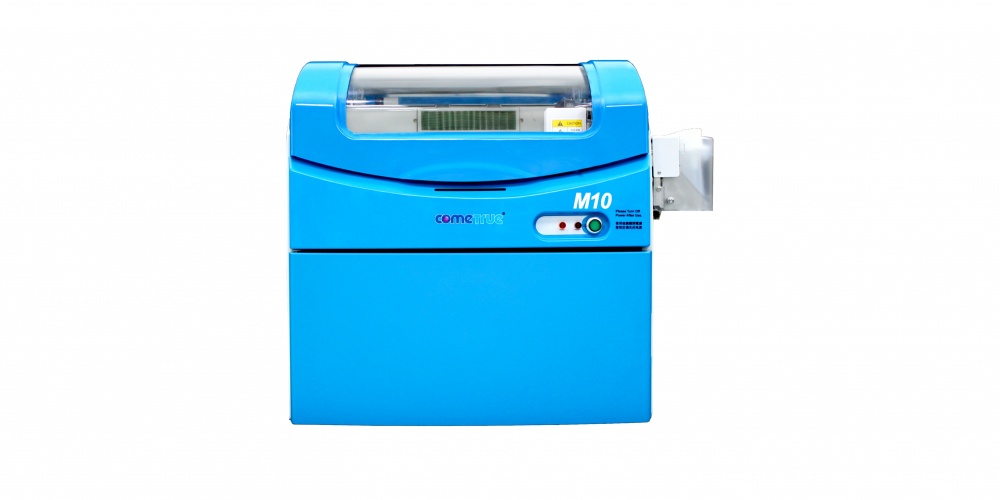
ComeTrue M10 3D Powder/Binder Ceramic Printer
It should be noted that the users with which I've talked have the full-color A10 version. But, the reviews I'm getting so far, are largely positive and realistic. If they reported that a new powder/binder printer was absolute perfection, I would have dismissed them immediately. After all, we've lived with the Z450 for more than 5 years and pay a hefty price for support just to keep it running! But, what I have heard is that while there have been minor issues, the response by the support teams in both North America and abroad have been swift and helpful. That is wonderful news.
The ComeTrue M10 is their ceramic specific printer. I understand that the delivered price, with training and installation, comes in at around $20,000. So, it falls between the two Kwambio offerings in price. However, I have NOT seen a sample part. But, here is a video that might be helpful.
If and/or when I get my hands on an actual sample I will let you know.
NOT EITHER/OR
For our application to be successful, we need to be able to print at production levels. And, the most important factor is mitigating down time. All 3D printers fail. And, that is a given for a powder/binder printer. The issue is not a failure; but, how well you can avoid having that failure disrupt your business catastrophically. And, that probably means building in redundancy.
For an individual artist already creating ceramic works of art manually, a single $5,000 Kwambio Ceramo Zero Max is AUGMENTING your income. So, being down for a day or even a week isn't catastrophic. But, for others, sharing the down-time risk over 3 lower cost printers might be a better strategy than purchasing a single high cost printer.
If we are successful in the endeavor we have planned, which will provide employment and training for at-risk students on the autism-spectrum, our ultimate strategy might be to have several $5000 printers, a $20,000 printer and a $40,000 high-volume professional printer in order to provide the highest levels of performance and quality while mitigating the affects of temporary failure by sharing the load over several print platforms.
The point is that having multiple choices is terrific. As I learn more about each of these options I will be quick to share them with you.